Bangladesh National ID Card (NID) Check Online 2026: The National Identity (NID) card is one of the most important documents for Bangladeshi citizens. It is used for identity verification, banking, SIM registration, passport-related services, government services, and many other official purposes. If you want to check your voter information, claim your NID account, or download your NID card online, this updated guide will help you use the official services.nidw.gov.bd portal correctly.
If you are searching for how to check your voter ID card online, download an online NID copy, or verify NID information from Bangladesh or abroad, this guide explains the latest process in a simple way. We have also updated the expatriate section based on the latest publicly available Bangladesh Election Commission information.
NID Check Bangladesh – services.nidw.gov.bd
The official Bangladesh Election Commission NID portal allows eligible citizens to claim their account, verify voter information, and access available NID-related online services. If you already have a National ID card or registration record, you can use the official portal to check your information and continue the account claim process online.
If you do not yet have an NID card or have never completed voter registration, you will need to register first through the Election Commission process before expecting online NID access.
You can check your voter information or begin the NID account claim process online by following these steps:
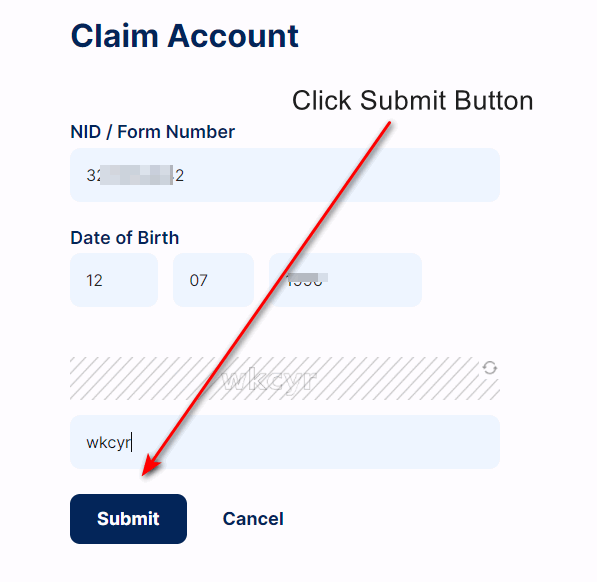
- Visit services.nidw.gov.bd/nid-pub/claim-account.
- Enter your NID number or Form number and your date of birth according to official records.
- Complete the captcha verification shown on the page.
- Click Submit to continue the process.
Once your information matches the Election Commission database, the system will take you to the next steps for address verification and account claiming.
Second Step: Select Address
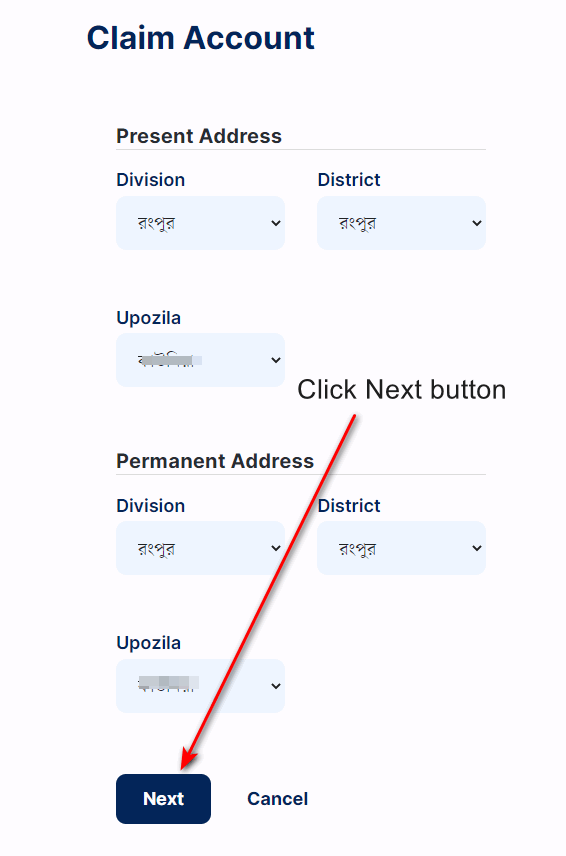
You cannot claim your NID account without selecting the correct address information. On this page, choose both your present address and permanent address using the correct division, district, and upazila as recorded in your NID profile.
If your address does not match the official record, the claim process may fail. That is why it is important to select the exact information already stored by the NID system. You can also read more details at services.nidw.gov.bd guide.
Third Step: SMS Verification and Identity Confirmation
After the address step, the portal usually shows your registered mobile number for verification. Click the SMS option to receive a 6-digit verification code on your phone and enter the code to continue.
In many cases, the account claim process may also require identity verification through the official NID Wallet app. The app is available on Google Play and is used to complete face verification during account claiming. For best results, use a smartphone with a working camera and stable internet connection.
If you do not receive the SMS code immediately, wait a short time and use the resend option when it becomes available.
Check Also:- Birth Certificate Check Online
Very Important:- How to get National ID card Bangladesh (নতুন ভোটার কার্ড করুন)
Must check:- National ID card Correction Online method
How to Download Your NID Card as a PDF
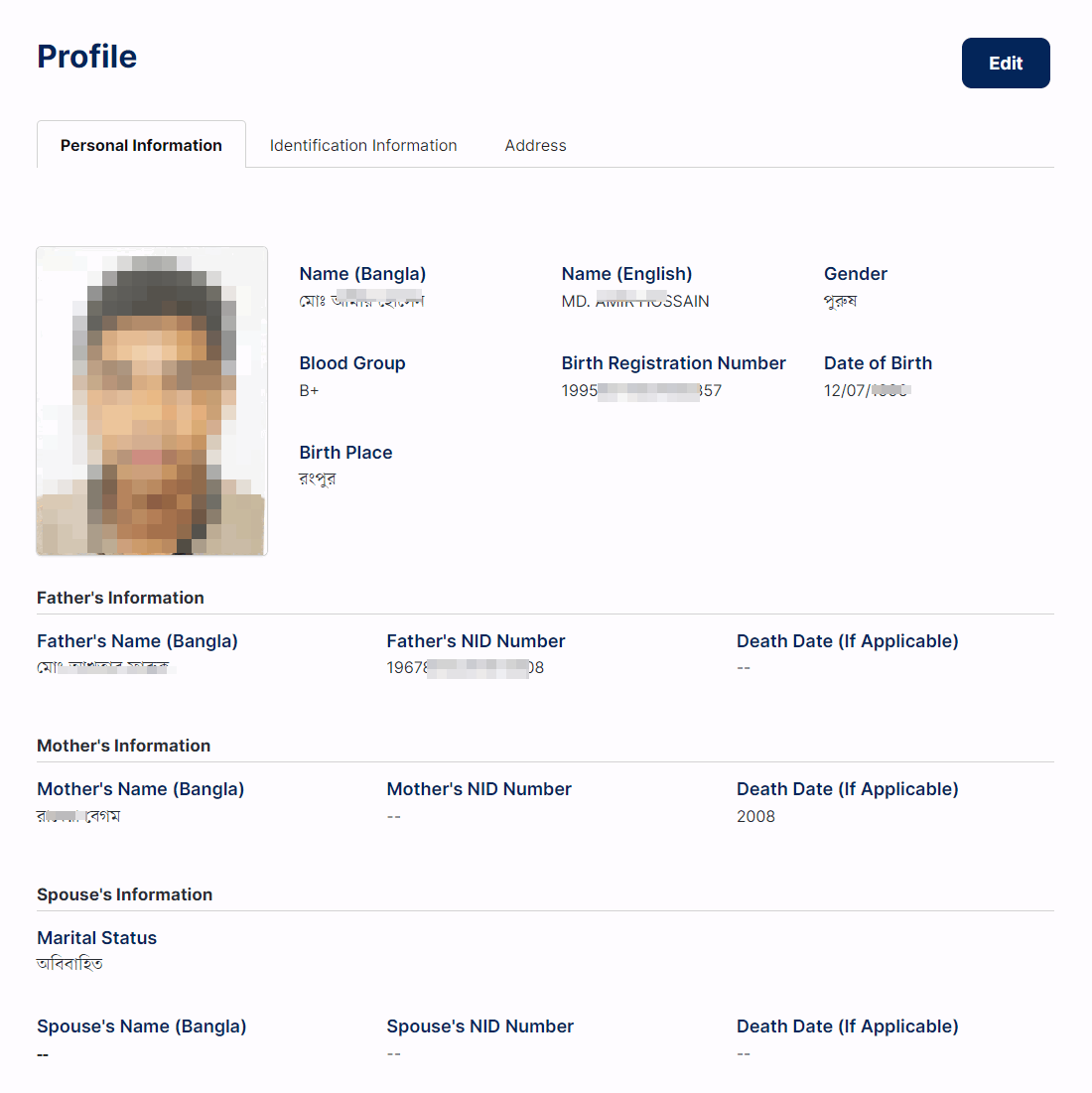
Once your account is successfully claimed and verified, you can log in to the NID portal and access available NID services, including downloading your online NID copy when the option is available for your profile.
- Step 1: Go to the official NID portal
Visit services.nidw.gov.bd/nid-pub/claim-account. - Step 2: Claim your account
Enter your NID or Form number, date of birth, and captcha code, then submit. - Step 3: Confirm address information
Select your present and permanent addresses exactly as shown in the official record. - Step 4: Complete mobile and app verification
Enter the SMS verification code and, if prompted, complete verification through NID Wallet. - Step 5: Log in and download
After successful verification, log in to your account and download the available NID copy in PDF format for personal use.
Bangladesh National ID Card (NID) Check Online
If you are a Bangladeshi citizen and want to check your voter information online, the official Bangladesh Election Commission platform makes it possible to verify basic voter-related details through the NID service system. The exact options visible to you may vary depending on whether your account has been claimed and whether your identity verification has been completed.
- Visit the Portal: Open services.nidw.gov.bd/voter_center.
- Enter Required Details: Provide your NID number or Form number and date of birth.
- Complete Captcha: Type the captcha code exactly as shown.
- Submit: Proceed to view or continue your voter information process.
Download Your NID Card in PDF Format
You can access your online NID-related options through the official portal after successful account verification. Follow the official steps below:
- Access the NID Portal
- Visit services.nidw.gov.bd/nid-pub/claim-account.
- If you already have account access, log in. Otherwise, claim your account first.
- Claim Your Account
- Enter your NID or Form number.
- Enter your date of birth.
- Complete the captcha and submit.
- Verify Address
- Select your present and permanent addresses as per official NID records.
- Verify with SMS and NID Wallet
- Use your registered mobile number to receive the code.
- Complete any app-based face verification if prompted.
- Download Available NID Copy
- After successful login, download your available NID PDF copy and save it securely.
NID Wallet Mobile Application for Identity Verification
The NID Wallet mobile application is the official app used during the account claim process for identity verification. According to the Google Play listing, the app helps make NID-related services available on your phone and currently supports account claim verification through face scanning.
How to Use NID Wallet
- Download the official app from the Google Play Store.
- Open the app on a phone with a camera and internet connection.
- Start the NID account claim process on the web portal.
- Scan the QR code or follow the verification method shown by the portal.
- Complete face verification to finish the identity confirmation step.
Important: At the time of checking, the officially verified public app listing is on Google Play. Users should follow official Election Commission updates for any future platform expansion.
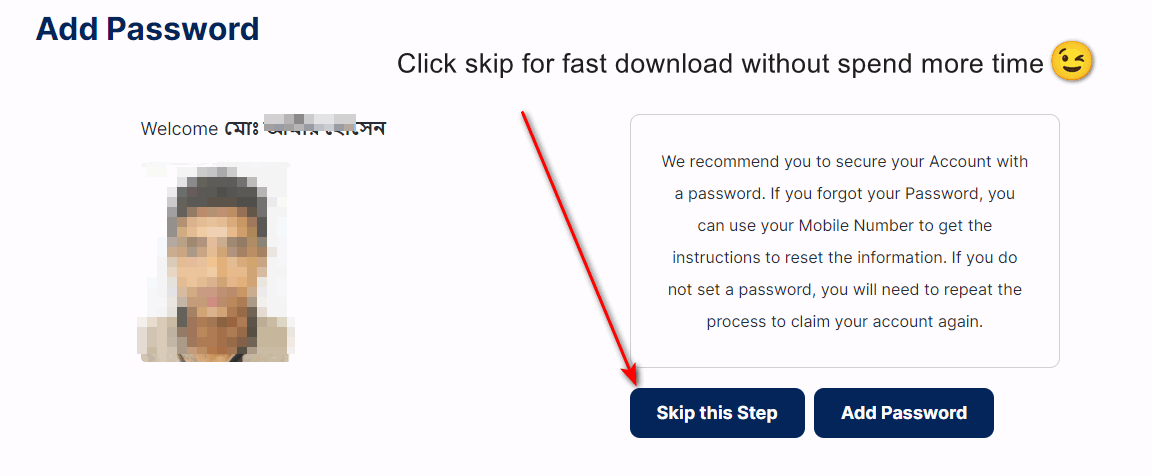
It is strongly recommended that you secure your NID account with a password after claiming it successfully. A strong password will make future logins easier and safer. If you skip creating a password, you may need to repeat part of the account claim process later.
Fourth Step: Set Password and Download Online Copy
After successful verification, you may be asked to create a password for future login at services.nidw.gov.bd. You may also have the option to set a username. If no custom username is set, your NID number may be used as the default login identifier, depending on the system workflow shown to you.
Once the process is completed, you can proceed to the account dashboard and access the available NID copy or related services.
What to Do If You Lose Your NID Card
If your National ID card is lost, damaged, or unavailable, the official NID system allows citizens to apply for the relevant service according to Election Commission rules. Depending on the service type, official fees may apply for duplicate, correction, or reissue-related applications.
- Log in to your NID account.
- Choose the required service and update the relevant information if necessary.
- Pay the applicable fee if the selected service requires it.
- Download the available online copy or follow the official delivery process.
For a detailed lost card guide, see:- Get Lost NID card
We hope this updated guide helps you check your NID information, claim your account, complete verification, and access your available online NID copy through the official Bangladesh Election Commission service portal. Always use the official website and verify your information carefully before submitting.
Smart Card Integration and Advanced Services
Bangladesh’s smart NID system remains an important part of digital identity verification. Smart card-related services may be relevant for identity validation, service access, and official verification processes. If you want to check distribution or related status updates, use this guide:- Smart Card Status Verification (স্মার্ট কার্ড স্ট্যাটাস চেক)
Professional Support and Customer Service
If you face any problem while claiming your account, verifying your information, or accessing NID services online, you can contact the official NID support channels below:
Support Channels:
📧 Email: [email protected]
📞 Hotline: 105 or +88 01708-501261
🕐 Hours: Sunday-Thursday, 9:00 AM-5:00 PM
🌐 Official Portal: services.nidw.gov.bd
Frequently Asked Questions (FAQs)
What is the official website for checking and downloading the NID card?
The official website is services.nidw.gov.bd/nid-pub/claim-account.
Can I check my voter information online?
Yes, eligible users can use the official NID portal and related online service pages to begin verification or account claim using their NID/Form number, date of birth, and captcha.
Do I need NID Wallet to claim my account?
In many cases, yes. The official NID Wallet app is used for identity verification during account claiming.
Is every NID-related online service free?
Not always. Some services such as correction, duplicate, or other applications may require official fees depending on service type.
What should I do if I face problems during the process?
Contact official support at [email protected] or call 105 / +88 01708-501261 during office hours.
Can expatriates vote from abroad right now?
Expatriates should follow the latest official Election Commission notices regarding IT-supported postal voting, registration instructions, and eligibility windows instead of depending on unofficial social posts or outdated claims.
Professional Disclaimer: For safety and accuracy, always follow the latest instructions published by the Bangladesh Election Commission and the official NID online service portal before submitting personal information or making any payment.