Every Bangladeshi citizen needs their National Identity (NID) card to open a bank account, register a SIM, apply for a passport, vote, and access dozens of official government services. The Bangladesh Election Commission manages all NID services through one platform: services.nidw.gov.bd. This guide walks you through every step — from claiming your account for the first time to downloading your NID card as a PDF — using the current process as of 2026.
What You Need Before You Start
Before visiting the NID portal, gather these details:
- NID number or Form number — your 10-digit or 17-digit NID number, or the Form number from your voter registration slip
- Date of birth — exactly as it appears on your official NID record
- Registered mobile number — the number linked to your NID account for SMS verification
- NID Wallet app — installed on an Android device with a working front camera (required for face verification in most cases)
- Stable internet connection — the portal requires uninterrupted access during verification steps
If you have never registered as a voter or you have no NID number at all, you must first complete the voter registration process through the Bangladesh Election Commission before using the online NID portal. New voter registration is handled separately through the Bangladesh Election Commission.
Phase 1: Claim Your NID Account Online
Claiming your account links your NID record to an online login. You only do this once. After claiming, you can log in directly each time.
Step 1 — Go to the Account Claim Page
Visit services.nidw.gov.bd/nid-pub/claim-account. Enter your NID number (or Form number) and your date of birth. Complete the captcha and click Submit.
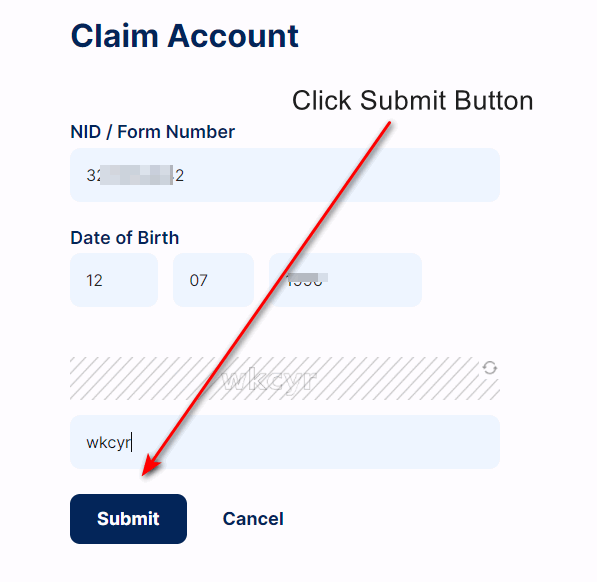
When your NID number and date of birth match the Election Commission database, the portal moves you to the address selection step. If they do not match, double-check that you are using the number and birth date exactly as stored in the official record — not an approximation or a different format.
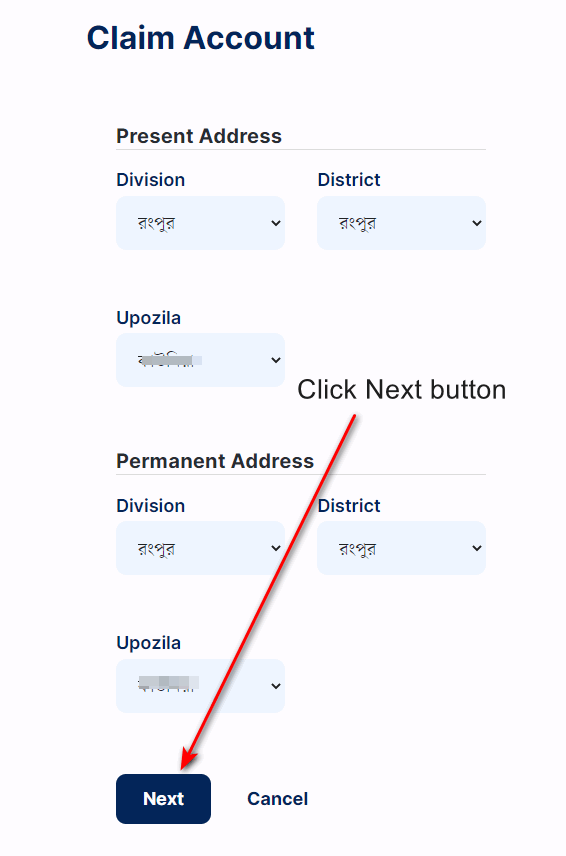
Step 2 — Select Your Address
The portal asks for both your present address and permanent address at the division, district, and upazila level. These must match what the NID system has on file for your record.
This is the most common point where claims fail. If you moved after your initial voter registration and the NID record was not updated, your current address will not match. In that case, you will need to update your NID address before completing the claim.
Step 3 — Mobile Verification
After confirming your address, the portal displays the mobile number registered to your NID account. Click the SMS option. You will receive a 6-digit code on that number. Enter it within the time limit shown on screen. If the code does not arrive, use the resend option after the countdown ends — do not refresh the page.
If you no longer have access to your registered mobile number, contact the official NID helpline (105) to arrange an alternative verification method.
Step 4 — Face Verification via NID Wallet
Many account claims require an additional face verification step using the NID Wallet app. Download it from the Google Play Store. Open the app on a phone with a front-facing camera and a steady internet connection, then follow the on-screen instructions to scan your face. The app compares your live face with the photo stored in the Election Commission database.
For best results: sit in a well-lit space, remove glasses if possible, and keep your face centred in the frame. The verification usually completes in under 30 seconds.
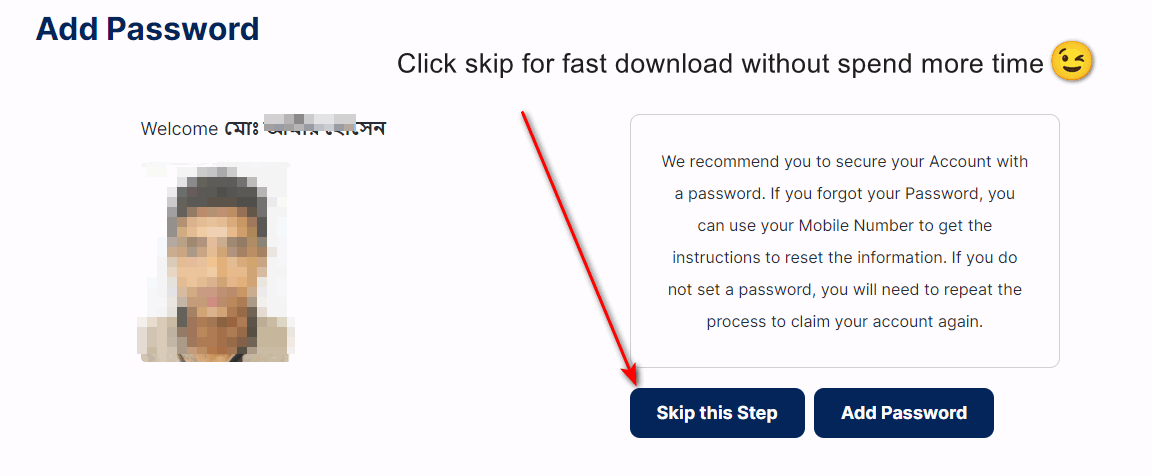
Step 5 — Set Your Password
Once verification is complete, the system asks you to create a password for future logins. Choose a strong password and store it securely. If you skip this step or forget the password later, you may need to repeat part of the claim process. Your NID number serves as your default login ID unless you set a custom username.
Phase 2: Check Your NID Information Online
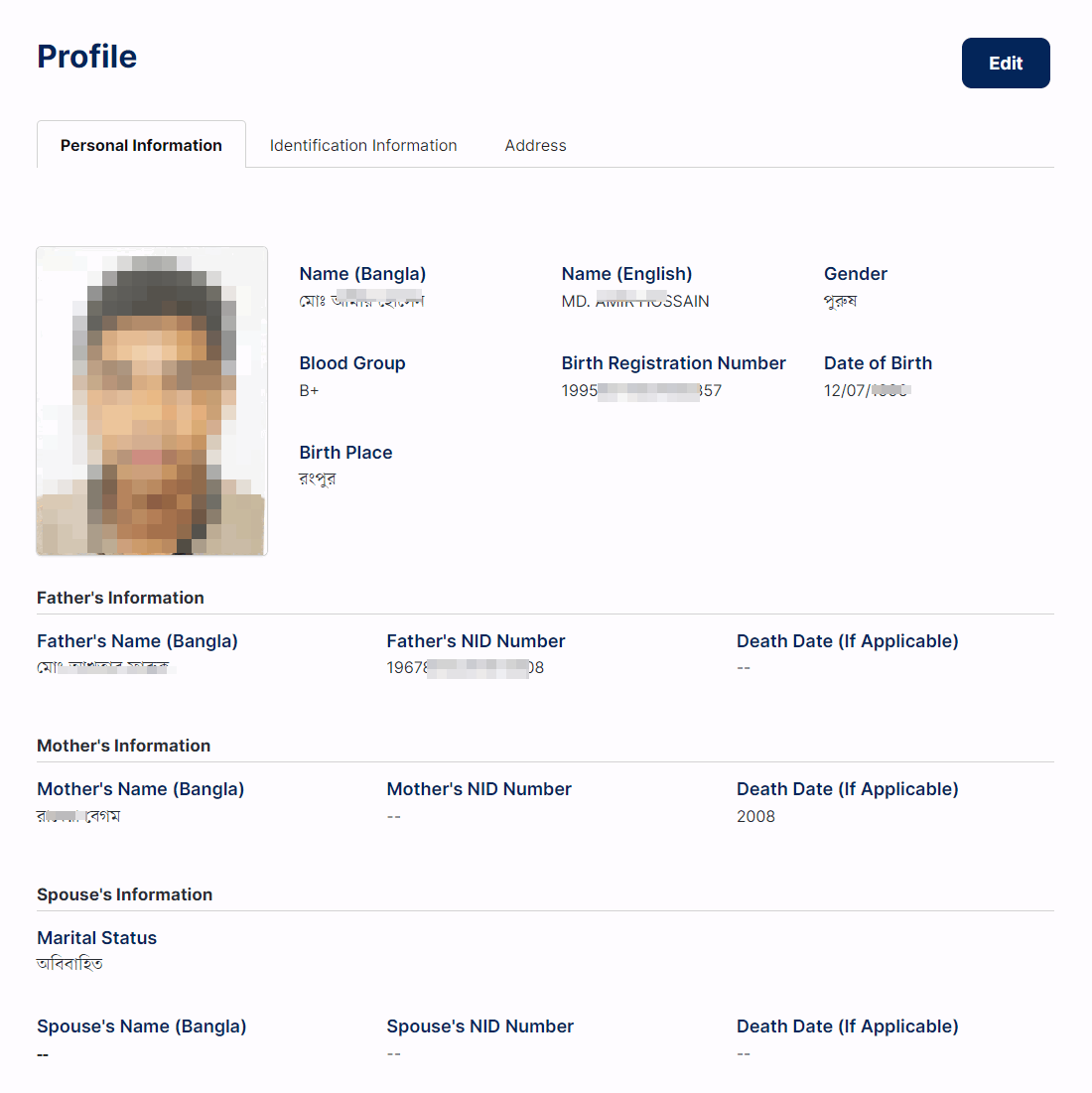
After claiming your account, you can check your voter information by visiting services.nidw.gov.bd/voter_center. Enter your NID or Form number, your date of birth, and the captcha code, then submit. The portal shows the basic voter details linked to that record.
The information visible to you may vary depending on your account status, verification level, and which services the Election Commission has made available for your profile at the time of checking. Always use the official portal to avoid entering personal details on unofficial websites.
Phase 3: Download Your NID Card as a PDF
After your account is successfully claimed and verified, you can access NID download options through your account dashboard. Here is the process:
- Log in at services.nidw.gov.bd using your NID number and the password you set during account claiming.
- Go to your account dashboard and look for the NID copy or download section.
- Select the PDF download option if it is available for your profile.
- Save the downloaded file securely. This online copy can be used for many official purposes where a physical card is not required.
Not every account will see the download option immediately. Availability depends on your verification status and the services enabled for your NID record. If the download option is not visible, your account may require additional verification steps or the option may not yet be active for your profile.
If Your NID Card Is Lost or Damaged
A lost or damaged NID card can be replaced through the official NID system. Log in to your account at services.nidw.gov.bd, select the appropriate service (duplicate, correction, or reissue), and follow the steps shown. Official fees apply for certain service types — the exact amount depends on which service you select. After submitting your request, follow the official delivery or collection process provided by the Election Commission.
For a detailed walkthrough: How to apply for a lost NID card
Smart Card and Other NID Services
Bangladesh’s smart NID card carries a chip for electronic identity verification. The Election Commission issues smart cards in phases. To check the distribution or delivery status of your smart card: Smart Card Status Check.
Other NID-related services:
- How to register for a new NID card — for first-time voters
- NID card correction online — fix name, date of birth, or address errors
- Birth certificate check online
How the NID System Works Behind the Scenes
The NID database isn’t just a voter list — it’s become the backbone of identity verification (KYC, or “Know Your Customer”) across Bangladesh. When you open a bank account, register a mobile SIM, or apply for a passport, that organization runs an automated check against the Election Commission’s NID database rather than manually verifying paperwork. This is why entering incorrect NID details when opening an account or registering a SIM causes an instant rejection — the system is checking your data against the central record in real time.
The same matching process is also the main defense against duplicate registration: when someone tries to register as a voter more than once under a different name or address, matching fingerprint and iris data against existing records is what catches it. The database itself holds roughly 128 million records (127,711,793 registered voters as of the 2026 general election) and is hosted at Bangladesh’s Tier-IV National Data Center in Kaliakair, Gazipur — an Uptime Institute–certified facility where the Election Commission is one of several government bodies storing data.
Web Portal vs. NID Wallet App — What Each One Is For
| Channel | What it’s for |
| services.nidw.gov.bd | Account claiming, profile corrections, checking voter info, PDF download, application tracking |
| nidw.gov.bd (main site) | General information, legal circulars, policy notices, downloadable offline forms for cases that need in-person processing |
| NID Wallet app | Face verification during account claim and sensitive changes — some web actions require you to confirm on the app before they go through |
If a web action asks you to check your phone or scan a QR code, that’s the system confirming you’re the one physically present with the registered device — not just someone who has your password. Don’t approve a face-verification or QR prompt you didn’t trigger yourself.
New Voter Registration: What Actually Happens
If you don’t have an NID number yet, registration happens in three stages — one online, two in person.
Stage 1: Online Pre-Registration
Citizens aged 16 and older can start at the Election Commission‘s online registration form: full legal name, date of birth, and mobile number (verified by OTP), followed by a longer form covering address, education, marital status, and identifying marks. Submitting it generates an application summary (Voter Registration Form-2) — print this, you’ll need it for the next stage.
Stage 2: Document Verification
You’ll need supporting documents: your birth registration certificate (spelling and dates must match your application exactly, or it gets rejected), your parents’ NID numbers, an educational certificate (SSC/HSC) to confirm your date of birth, and a utility bill or similar proof of address.
Stage 3: Biometric Enrollment (In Person)
Bring your printed Form-2 and documents to your local Upazila/Thana Election Office. An officer checks your papers against the database for duplicates, then you’ll have your fingerprints (all ten), an iris scan, and a photograph captured. You’re issued a Registration Slip Number — keep this safe, it’s your tracking reference until the card is ready and how you’ll eventually claim your online account.
Why Some NID Corrections Take Longer Than Others
Not every correction is approved at the same level — the Election Commission classifies requests by how sensitive the change is, and a more sensitive change gets reviewed higher up the chain:
| Category | Approved by |
| ক (Ka) | Thana/Upazila Election Officer |
| খ-১ (Kha-1) | Additional District Election Officer |
| খ (Kha) | District Election Officer |
| গ-১ (Ga-1) | Additional Regional Election Officer |
| গ (Ga) | Regional Election Officer |
| ঘ (Gha) / “Category D” | Director General, NID Wing (central level) |
Under a Standard Operating Procedure issued by the Election Commission in December 2025, all date-of-birth correction applications were reclassified as Category ঘ (Gha) and centralized to the DG level — so if you’re correcting your birth date, expect it to be reviewed centrally rather than at your local office, and to take longer than a simple spelling fix handled at Upazila level.
NID Correction & Reissue Fees
Fee amounts here change — verify the current figure on the official portal before paying. As of the most recent information available, standard correction fees have been in the range of ৳115–345 depending on how many fields you’re correcting, paid via bKash, Nagad, or Rocket directly on the portal. The Election Commission also proposed a substantial fee increase (up to ৳5,000 + 15% VAT for information corrections) in late 2025 — whether and when that takes effect can change the amount significantly. Don’t rely on any fee figure you see on a third-party site, including this one — confirm it on services.nidw.gov.bd immediately before you pay.
Smart NID Card Security Features
The Smart NID replaces the older laminated paper card with a polycarbonate card carrying an embedded chip that stores your biometric data in encrypted form and can be verified offline (no internet needed at the checkpoint). Security features include micro-text and color-shifting ink visible to the naked eye, hidden patterns visible only under UV light, and a Machine Readable Zone (MRZ) on the back for use at borders and other automated checkpoints. If your physical card looks tampered with or the chip stops reading, apply for a replacement rather than continuing to use it.
NID Registration for Expatriates (NRBs)
Bangladeshis living abroad don’t need to travel home to register. The process runs through Bangladesh’s overseas missions: you submit your application and scanned documents (passport, residence permit/visa) online, then attend a scheduled biometric appointment at your nearest embassy or consulate for fingerprints, iris scan, and photo. That data is sent to Dhaka for processing, and the printed card is returned to the mission for you to collect. Check with your specific embassy for their current appointment process, since procedures can vary by mission.
Troubleshooting Common NID Problems
Face verification keeps failing
Use a well-lit room without harsh shadows, hold the phone steady at eye level, and follow the on-screen movement prompts (look ahead, turn slowly left then right) without rushing. If it keeps failing, update the NID Wallet app to the latest version and try again — outdated app versions are a common cause.
My account got locked
Repeated failed login or OTP attempts can trigger a temporary security lock. Wait before trying again rather than repeatedly retrying, which can extend the lock. If it doesn’t clear on its own, call the NID helpline (105) to verify your identity and get it reset.
I lost my registration slip and never got my NID number
You can’t recover this online without an NID number. Visit your local Upazila Election Office in person and file a tracking request — an officer can locate your record using your name, parents’ details, date of birth, and biometric data on file, and issue you your NID number.
Keep Your NID Account Secure
- Never share your OTP, password, or live face-verification session with anyone claiming to help you “faster” — no legitimate agent needs this.
- Before entering your NID number or date of birth anywhere, check the address bar ends in .gov.bd. Sites with names designed to look official (extra words like “gov” or “bd” stuffed into a .com domain) are not run by the government.
- If you hand a photocopy of your NID to an organization, write down what it’s for directly on the copy — this makes it harder for the copy to be reused for something else.
NID Support Contacts
If you cannot complete account claiming, face a verification error, or have questions about your NID record, contact the official Bangladesh Election Commission NID support team:
- Hotline: 105 or +88 01708-501261
- Email: [email protected]
- Office hours: Sunday–Thursday, 9:00 AM–5:00 PM
- Official portal: services.nidw.gov.bd
For general Election Commission enquiries and voter registration matters, visit the Bangladesh Election Commission website directly.
Frequently Asked Questions
What is the official website for NID check and download in Bangladesh?
The official platform is services.nidw.gov.bd, operated by the Bangladesh Election Commission. All NID account claiming, voter information checks, and download services are available through this portal.
I do not have an NID card yet. Can I still use the portal?
No. You must first complete voter registration through the Bangladesh Election Commission before the NID portal can locate your record. The online portal only works for citizens who have an existing NID number or Form number in the system.
Is the NID Wallet app required?
In most cases, yes. The NID Wallet app is used for face verification during the account claim process. Download it from the official Google Play Store listing. You need an Android device with a working front camera.
Are NID services free?
Claiming your account and checking voter information online is free. However, some services — such as applying for a duplicate card, making corrections, or requesting a reissue — require payment of official fees. The exact fee depends on the service type and is shown during the application process.
My registered mobile number is no longer active. What do I do?
If you cannot receive the SMS code on your registered number, contact the NID helpline at 105 or +88 01708-501261 during office hours. The support team can guide you through the alternative verification steps for your situation.
Can I check my NID from outside Bangladesh?
The online portal at services.nidw.gov.bd is accessible from abroad. However, you must have the NID Wallet app installed on a compatible device for face verification, and your registered mobile number must be able to receive SMS. For any expatriate-specific voter or NID services, follow the latest official notices from the Bangladesh Election Commission.
Note: NID-related processes and portal features are updated by the Bangladesh Election Commission. If any step in this guide does not match what you see on screen, check the official portal or contact NID support for the current process. Always use the official website and verify your information carefully before submitting personal data.