If you are a Bangladeshi citizen and have registered as a voter but have not yet received your Smart NID Card, you do not need to visit the Election Commission office physically. You can now easily check the NID Smart Card Status online and also through SMS. This service helps citizens know whether their card is ready, which box number it has been placed in, and from where it needs to be collected.
This article will guide you step by step on how to check your Smart Card status, download your NID online copy, and answer the most common questions regarding Smart Cards in Bangladesh.
What is the NID Smart Card?
The Smart National Identity Card (Smart NID) is an upgraded form of the Bangladeshi voter ID card issued by the Election Commission Bangladesh (EC). Unlike the older laminated NID card, the smart card includes a built-in microchip, similar to SIM cards or ATM cards, which stores voter information securely.
The initiative began as part of a digital modernisation project and has already covered most city corporations and district areas. Since 2019, new voter registrations are automatically issued smart cards instead of the old laminated versions. Older voters are being gradually upgraded to smart cards through a phased distribution process.
Key features of the Smart Card include:
- Digital microchip for secure storage of voter information
- Enhanced protection against forgery
- Durable material compared to laminated cards
- Nationwide acceptance as proof of identity
Why You Should Check Smart Card Status
Many new voters and even old voters who applied for replacement cards often remain uncertain about whether their smart card has been printed or distributed. By checking the NID Smart Card Status, you can:
- Confirm if your smart card has been issued
- Know the distribution center or election office where it is available
- Find out your assigned Box ID and Camp ID
- Save time by avoiding unnecessary visits to the election office
How to Check Smart Card Status Online
Checking your smart card status online is simple. Follow these steps:
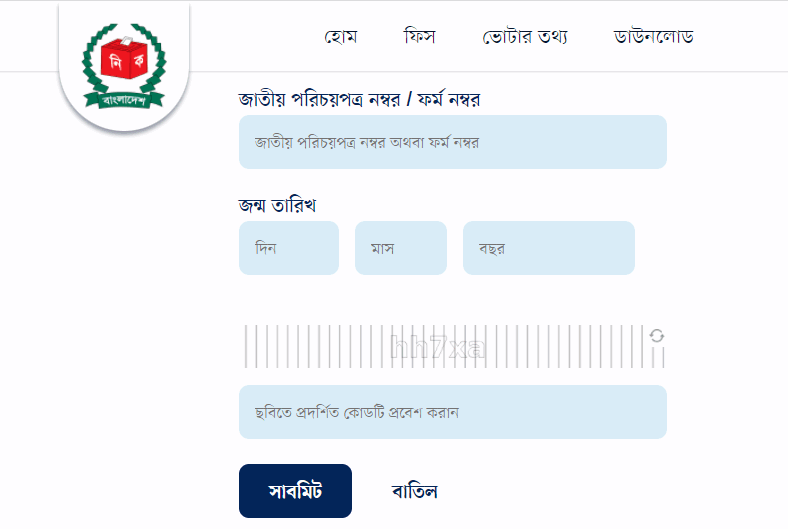
- Go to the official Election Commission website: Smart Card Status Check
- Enter your NID Number or Form Number
- If you do not yet have an NID, use your voter registration slip number (Form Number).
- Example: If your form number is
65487636, you need to enter it asNIDFN65487636.
- Input your Date of Birth in the format DD-MM-YYYY
- Fill in the Captcha Code shown on the screen
- Click the Submit button
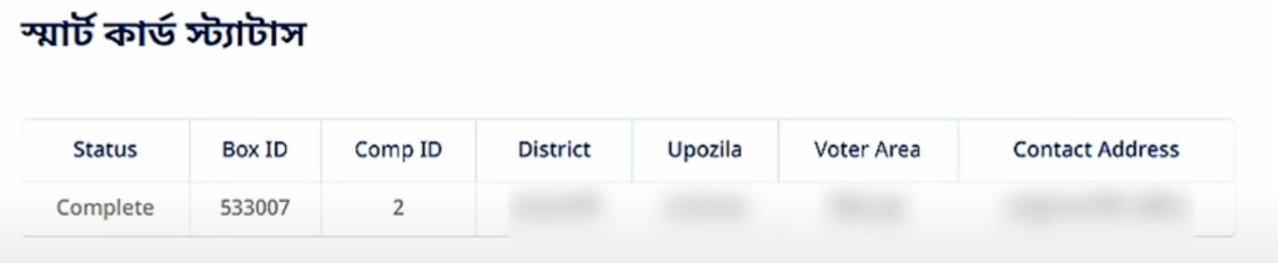
Once submitted, the system will show whether your smart card is ready. If the status shows Complete, it means your card has been printed and is ready for distribution. It will also display which election office to contact.
Checking Smart Card Status by SMS
If you do not have internet access, you can still check your smart card status using your mobile phone by sending an SMS.
SMS Format Using NID Number:
SC NID 123456789
Send to 105
SMS Format Using Form Number (Voter Slip):
SC F 9876543219 02-02-1990
Send to 105
After sending the SMS, you will receive a reply message showing whether your card is ready or still under process. If it is ready, the SMS will confirm that your card is available for delivery. If not, it may show messages such as “Your card distribution date is not scheduled yet, please try later.”
NID Online Copy Download – Is It Possible?
One common question is whether the Smart NID Card can be downloaded online. The direct answer is no, because the smart card is a physical card with a microchip that cannot be replicated digitally. However, you can download a NID Online Copy from the official Election Commission portal.
Steps to download the online copy:
- Visit services.nidw.gov.bd
- Log in with your NID number and password (if you already registered an account)
- Verify with your mobile number and OTP
- Download the PDF copy of your NID card
This online copy can be printed and laminated for temporary use until the official smart card is distributed. It is accepted in most government and private institutions.
Lost or Damaged Smart Card – What to Do
If your smart card is lost or damaged, you cannot download a replacement online. Instead, you must apply for a Re-Issue at your nearest Election Commission office. The application process usually requires:
- Filling up a re-issue form
- Providing fingerprints for verification
- Paying a small fee (depending on urgency)
- Submitting supporting documents
The replacement process may take several weeks.
FAQs
1. Status shows “Complete” but I did not receive my card
If your status shows “Complete” but you have not yet collected your card, you need to visit the election office mentioned in the status details with your voter slip.
2. Can I use the online copy instead of a smart card?
Yes, the online copy is valid for most services, but for biometric verification or official distribution programs, you will need the physical smart card.
3. Does the smart card contain money like an ATM card?
No, the smart card does not contain money. The chip inside the card only stores digital voter information.
4. Can I check my smart card status with a 10-digit, 13-digit, or 17-digit NID?
Yes, you can check the status using any valid NID number format or with your voter slip number.
Smart Card Status and Distribution in 2025
The Election Commission of Bangladesh has been actively distributing smart cards across the country. Most major city corporations have already completed smart card distribution. In rural areas and unions, the process is ongoing.
As of 2025, all new voter registrations are automatically being issued smart cards, while older laminated NID cards are gradually being replaced. Citizens are encouraged to regularly check their smart card status online to know when and where to collect them.
Check also- NID check BD 2025 (জাতীয় পরিচয় পত্র সংগ্রহ করুন)
Conclusion
The NID Smart Card Status Check system has made it much easier for Bangladeshi citizens to track the progress of their smart card without visiting the Election Commission office in person. You can check it online via the Election Commission’s official website or by sending an SMS to 105.
Remember:
- For lost or damaged cards, visit the Election Commission office for a re-issue.
- If the status shows Complete, your card is ready for collection.
- You can always download a temporary NID online copy for use until you receive your smart card.