Your Spark Driver login is the email address you enrolled with, followed by a one-time code sent to the phone number on your account. You can sign in through the Spark Driver app or the Spark Driver website. If you are locked out and chat is not an option, the official Spark Driver support phone number is (833) 848-1160.
Spark Driver at a glance
Official website: sparkdriverapp.com
Official help center: sparkdriverapp-walmart.helpdocs.io
Support bot in the app: 24/7
Support phone: (833) 848-1160
Reviewed 15 November 2026 against sparkdriverapp.com and the official Spark Driver help center. This is an independent guide, not a Walmart or Spark Driver page, and you cannot sign in here. See our Editorial Policy.
Spark Driver log in: the three things it asks for
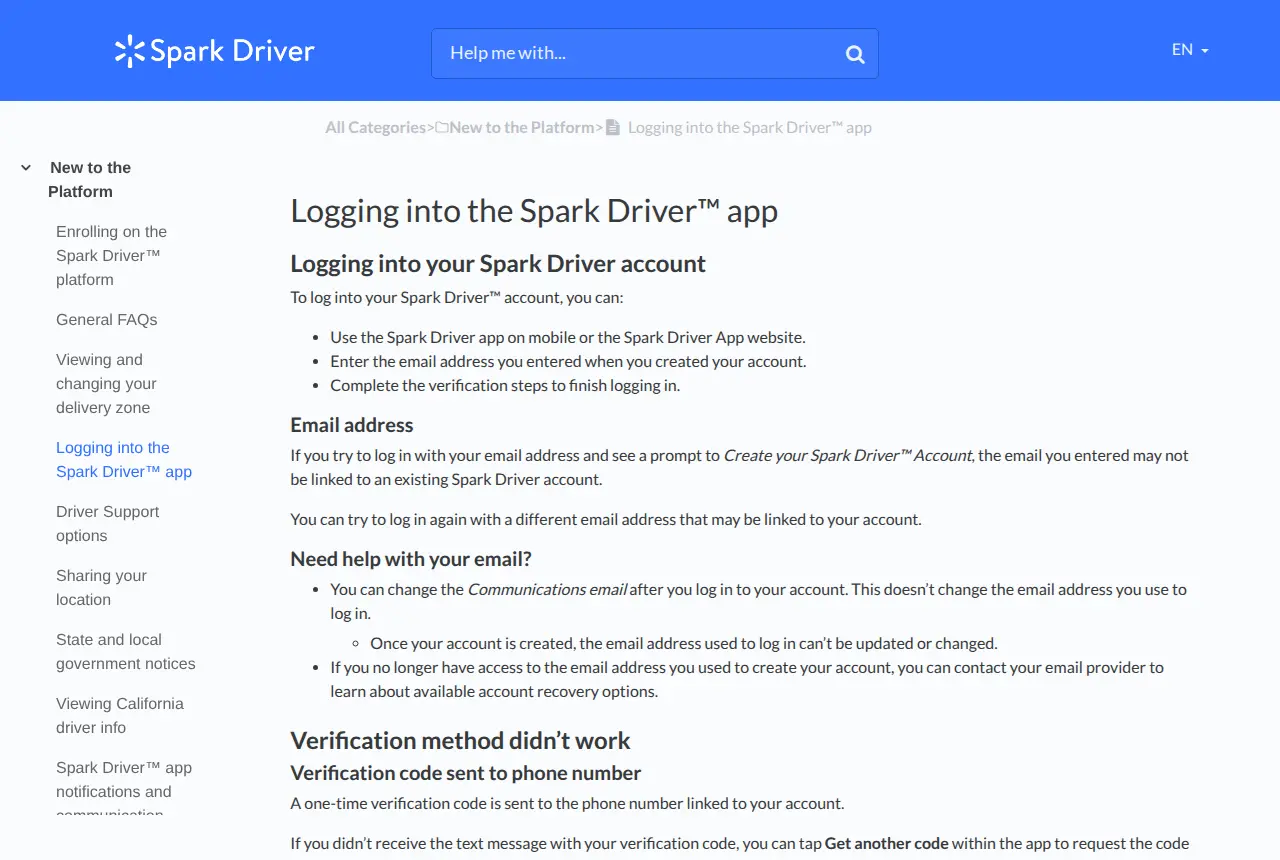
The official help article on logging in lists three steps, and each one trips people up in a different way.
1. The app or the website
You can use the Spark Driver app on your phone or the Spark Driver app website. On the website, the home page link reads “Already started signing up? Log in here.”
2. The email address you created the account with
There is no separate username. If you type an email and the screen offers to “Create your Spark Driver Account”, that does not mean your account is gone. It means that email is not linked to an existing account, so try your other addresses before creating anything new. You may only have one Spark Driver account.
3. The verification code
A one-time code goes to the phone number linked to your account. If the text does not arrive, tap “Get another code” in the app.
Reset a forgotten Spark Driver password
- Tap “Forgot password?” on the login screen.
- Select how you want to receive your verification code.
- Enter the code sent to your email and tap CONTINUE, then the code sent to your phone and tap CONTINUE.
- Choose a new password that meets the listed requirements.
- Tap “Create your new password and sign in”.
A password you have used before is rejected with the message “Please choose a different password.”
You cannot change your login email
This catches many drivers. Once the account is created, the email address used to log in cannot be updated or changed. What you can change after logging in is the Communications email, which only controls where messages are sent. If you have lost access to the mailbox itself, the help center’s advice is to contact your email provider about account recovery.
Spark Driver app login not working: what to try
For login failures, the help center gives three checks:
- Update to the latest version of the Spark Driver app.
- Update your phone to the latest version of its operating system.
- Turn your phone off completely and restart it.
For a Spark Driver app that opens but misbehaves, the official list goes further: close and reopen the app, sign out and back in, connect to the store’s free Wi-Fi if you are inside one, and for GPS or navigation trouble uninstall the app and download the latest version.
Run the built-in troubleshooting test
If offers or notifications have stopped, tap More (iOS) or Menu (Android), then Settings, then Troubleshooting. The app runs three tests: Spark settings, Token registration and Test notification. Green checkmarks mean it is working as expected. A red exclamation mark comes with instructions for fixing that item.
Spark Driver support: chat first, then the phone number
Most searches for a Spark Driver customer service number end here. The platform puts chat first and keeps the phone line as the fallback.
Spark Driver support chat
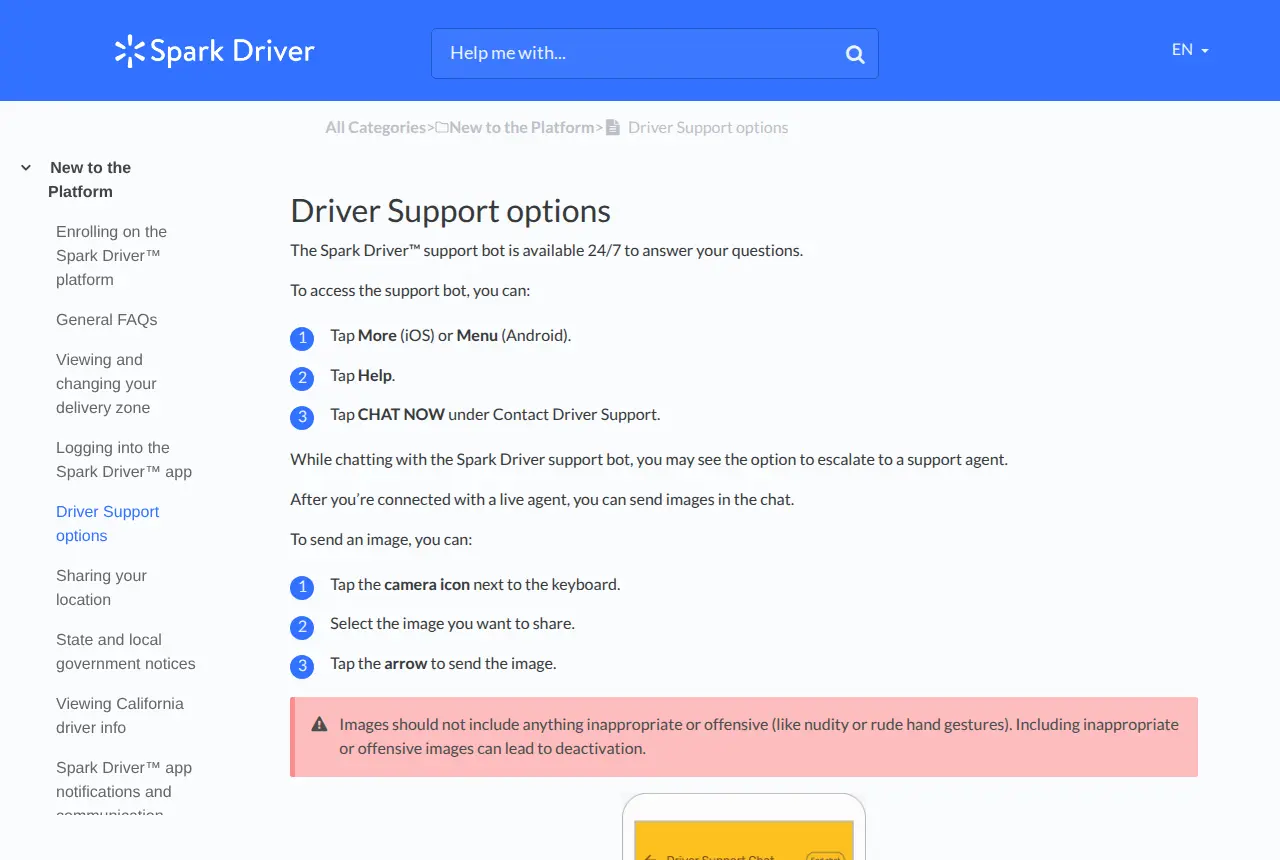
The support bot is available 24/7. To open it:
- Tap More (iOS) or Menu (Android).
- Tap Help.
- Tap CHAT NOW under Contact Driver Support.
During the chat you may be offered the option to escalate to a support agent. Once a live agent joins, you can send screenshots with the camera icon next to the keyboard.
Spark Driver support phone number
If you cannot find what you need and chat is unavailable, the help center says to call Spark Driver Support on (833) 848-1160. The official page describes the support bot as available 24/7; it does not publish opening hours for the phone line, so treat any “24/7 telephone number” you see elsewhere with caution and use only this number.
Spark Driver sign up, if you do not have an account yet
You cannot log in until you have enrolled. To become a Spark Driver, the Walmart Spark Driver application is completed inside the app: download the Spark Driver app from the App Store or Google Play and start from the “Sign up or log in” screen.
- Enter the email you want to use and select CONTINUE. If an account already exists for it, you are sent to log in instead.
- On “Create your Spark Driver account”, enter your first name, last name, phone number and a password.
- Enter the verification codes sent to your email and your phone, then tap Create account.
- Confirm you meet the eligibility requirements and choose your communication options.
- Enter your ZIP code and pick a delivery zone.
- If the zone is open, complete the Sign-up checklist with your legal name, home address, Social Security number, date of birth and driver’s license details.
Spark Driver requirements before you apply
- Age 18 or older, authorized to work as an independent contractor in the U.S.
- A valid REAL ID-compliant driver’s license, or a driver’s license and Social Security card
- Identity check using your license and a selfie
- A U.S. mobile number (+1 and ten digits) and a phone with camera and GPS
- Proof of valid auto insurance showing your name, expiration date and vehicle
- Any required background screening
- Not currently employed as a Walmart or Sam’s Club associate
If your zone is full (the waitlist)
When a zone is full the app tells you so, and you can log in at any time to check its status. Choose carefully: once selected, a zone cannot be changed until you are approved and have completed at least three deliveries.
Identity checks after you are approved
Logging in is not the only verification. The app uses real-time identity verification, which means you are periodically asked to take a live selfie and a photo of your driver’s license. Failing an identity check is one of the listed reasons for deactivation, so do these in good light with your current license.
Account under review or deactivated
If you can sign in but cannot go online, look for a “Needs Attention” banner or a notice that Spark Now is unavailable. The help center separates an account under review, which can be restored, from a deactivation, which has a formal appeal. Its deactivation FAQ covers the main causes it lists: account sharing, invalid or expired insurance, and identity check failure. It also explains how to submit an appeal and how to start an Informal Dispute Conference. Use those in-app routes to respond.
Old Spark Driver website addresses
If you bookmarked drive4spark.walmart.com, it now redirects permanently to sparkdriverapp.com. The current official help pages point only to the app and that website for logging in, so be wary of older “portal” links that ask for your Spark password.
FAQ: Spark Driver login and support
Why can’t I log in to my Spark Driver account?
Usually because the email is not the one the account was created with, or the verification code went to a phone number you no longer use. After that, check the app and your phone’s operating system are up to date and restart the phone.
Is the Spark Driver app owned by Walmart?
Yes. Spark Driver is Walmart’s delivery platform for independent contractors, and Walmart’s old drive4spark.walmart.com address now forwards to the Spark Driver website.
Can I have two Spark Driver accounts?
No. The enrollment guide states you may only create one Spark Driver account. If you see a prompt to create an account, first try logging in with another email you may have used.
What phone do I need for the Spark Driver app?
A smartphone with a camera and GPS. The official FAQ lists iOS, or Android 11 or newer.
How do I talk to a real person at Spark Driver?
Open chat in the app (More or Menu, Help, CHAT NOW). The bot may offer to escalate you to a support agent. If chat is unavailable, call (833) 848-1160.
How long does the Spark Driver background check take?
The official FAQ says results are typically available within 1 to 7 business days. Your enrollment status is shown inside your app account.
What to remember
Three details solve most Spark Driver login trouble: the login email is fixed for life, the code goes to the phone on file, and chat inside the app is the front door to support. Keep (833) 848-1160 for the times chat is down. If your work also involves assigned online training, see our Relias login guide, and for a patient portal our Jefferson MyChart guide.